Before Installing
Here you will find all necessary information about the installation of your evon Smart Home.

Here you will find all necessary information about the installation of your evon Smart Home.
You need to consider a few things when implementing your smart home project. If you want, you can determine the following points yourself and go to an evon Smart Home partner of your choice with the results, or the evon Smart Home partner can accompany you and advise you through these steps.
In the beginning, there was a plan – what do I want my house to be capable of? Take your house plans and think of the following for each floor and room:
Basically, you have a free choice concerning the switch type, but for evon Smart Home, we only use pushbuttons. We recommend that you use pushbuttons with at least 2 to 4 pushbutton functions per unit (corresponding to a flush-mounted socket). Since evon Smart Home only switches 24V signals via the pushbuttons/ sensors, there are no particular requirements concerning current carrying ability.
Example:
In our example, we plan using the following switches:
It is important that you consider the number, function and type of lighting you wish to use for illumination. It is a good idea to draw your lighting circuits on a floor plan and note whether the circuits should be switchable or dimmable. Once you have considered the lighting circuits, the next thing to think about is the type and number of lights per lighting circuit: they will determine the optimum module selection:
The dimmable light will need the evon Smart Home dimmer module L1424. Each module can control 2 lighting circuits. In addition to the dimmer modules, you will need a dimmer pack for each dimmable light suitable for your type of bulb, for example the Eltako SUD12 1-10 V universal dimmer switch. The evon Smart Home dimmer module L1424 controls the dimmer pack via 0-10V or 1-10V; you can switch your dimmer pack or an intermediate relay on or off via the digital output of the dimmer module. Two dimmer circuits can be connected to each module.
The other lights will either require the evon Smart Home lighting module L1244 with integrated 230V/16A relay or the evon Smart Home lighting module L1144 to connect external relays for larger loads. You can choose either, or ask your electrician to decide for you. Four lighting circuits can be connected to each module.
Example:
Two normal and two dimmable lighting circuits are to be installed in the bedroom.
Both of the normal lighting circuits are used for the ceiling and balcony lighting; an evon Smart Home module L1244 (with 16A relays) is sufficient here. Only two of the four outputs of the lighting module are used, the other outputs can and should be used for other rooms.
The two dimmable lighting circuits are reserved for two reading lights positioned left and right of the bed; they will use an evon Smart Home dimmer module L1424. In addition, we will use a dimmer pack each, which will be connected later to the modules.
The number and type of blinds to be controlled determines which module is to be used. It doesn’t matter whether the shading element is a roller shade, internal blinds, external blinds, or an awning – the important thing is how it is driven. Use the evon Smart Home module Blinds module B1144 if the motor has a separate line for UP and DOWN and is supplied with 230V. If the motor has a reversing switch then use the evon Smart Home module Blinds module B1244. Each of these modules can control two shading elements.
Example:
The bedroom has a window and a balcony door whose shading elements are to be controlled. Both shading elements are equipped with a normal motor (UP/DOWN, 230V). We will therefore plan an evon Smart Home module B1144, whereby the first output will be used for the balcony door and the second output for the window.
To control temperature, you will need the evon Smart Home single room modules C1144 or C1244. Module C1144 is controlled by the evon Smart Home room operating panel and module C1244 via PT1000 sensors, or from an external demand value (for example from an analog input).
Four control valves and 4 room operating panels can be connected to the evon Smart Home single room control module C1144 and C1244, whereby this corresponds to 4 separate room control zones. Each output can be connected to as many valve drives in parallel as you wish; it is only limited by the load on the relay output. This is useful if you have to install several heating circuits in a room because of the heating pipe lengths and the room is to remain a single zone with a constant temperature distribution.
You still need temperature sensors in the rooms with module C1144 so that the controller can modify the temperature as required. Temperature sensors are already integrated into our room operating panels C1101, C1102, C1103 and C1104. When fully equipped, in addition to room temperature measurement, the models C1101 to C1104 also have other functions such as demand temperature selection, mode selector (comfort, energy-saving, frost protection) and presence button (raise/lower temperature when activated).
In contrast to module C1144, the temperature demand value and mode cannot be changed with module C1244, this is only possible via the App, since only a PT1000 temperature sensor can be connected to the input of module C1244.
Example:
Naturally, we also want to control the climate in the bedroom. There is a heating circuit in the bedroom. We select the room-operating panel C1103 (temperature sensor, demand value, mode setting and presence button), the choice is yours.
We need an evon Smart Home single room module C1144 for the heating circuit, whereby the valve requires an output leaving three outputs free.
Special functions such as doorbell, door opener, window contacts, garden irrigation, scene buttons etc. require our digital modules. To determine how many modules you need, consider first the number and type of special functions you require. The evon Smart Home digital module D1180 has 8 digital inputs at 24V DC and is normally used in conjunction with the evon Smart Home digital module D1208, which has 8 digital outputs. The evon Smart Home digital module D1344 combines 4 inputs and 4 outputs in one module.
The inputs are designed for 24 V DS for all modules. Make sure you never connect higher voltages or alternating current sources to the module; otherwise it will be irreparably damaged.
The outputs can be used, depending on the wiring, to switch either 24 VDC or 230 V AC, however note when using 230 V consumers, the load is ohmic and may not exceed 5 A! Ohmic loads are, for example, normal light bulbs, whereby LED lamps represent capacitive loads and must be switched using an external relay. If in doubt, please ask your electrician or evon Smart Home partner!
Example:
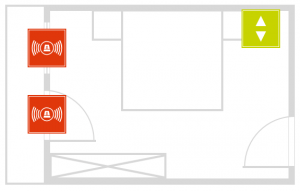
Using our bedroom example, we plan to add an alarm system and we need a digital input and a switch to activate and deactivate the alarm, and a closing contact for the window and balcony door.
We plan an evon Smart Home digital module D1180 with 8 digital inputs, whereby 4 inputs are for the bedroom (the 4 reserve inputs can be used for a further room). Two inputs are for the closing contacts and two others for the switch.
In our example, we demonstrate the planning of special functions via digital modules.
All cables must be routed to the consumer unit in which you have planned the corresponding module.
Each button will require a 24V voltage supply (+24V), and per pushbutton a cable that is connected to the pushbutton and the corresponding module. When cabling the sensors (pushbutton, contact, room operating panel) we recommend the use of communication cable (F-YAY) or CAT5 cables. If you wish to have more than one pushbuttons connected to a module input, you can either daisy-chain the cable in the room (from switch to switch, contact in the junction box) or cable all switches to the consumer unit and connect them all together there. The second variant gives you the advantage to only have the connection effort once, in the consumer unit, but increases the effort required for initial installation and cabling, and more space requirements in the consumer box.
Use deeper junction boxes as switch back boxes or boxes with more space – you will be grateful to yourself later when it comes to connecting the cables.
As opposed to a conventional electrical installation, the switches do not come into contact with the 230 V mains, however 230 V mains supply must still be routed into the consumer boxes to be connected to the evon Smart Home modules to provide power for the consumers (lighting circuits, blinds…).
Make sure that you do not forget cables for the room control unit, doorbell, window contacts, door opener etc. It is better to route one cable more than necessary than have one too few.
Sobald die Anzahl der evon Smart Home Module, Relais und Taster sowie die Aufteilung auf die Verteiler festgelegt ist, können die Schaltschränke dimensioniert werden. Aufgrund der Standardhutschienenmontage mit 45 mm Blende können evon Smart Home Module in jedem Standardverteiler installiert werden.
Alle Lichter, Jalousien und sonstige Lasten sowie alle Schalter, Fensterkontakte und Sensoren werden in den jeweiligen Verteiler geführt. Für die Schalter wird die Verwendung von mehradrigen Fernmeldekabeln (F-YAY) empfohlen. Diese werden am besten übersichtlich auf LSA Plus Leisten aufgelegt (siehe Vorlage Rangierliste).
Es ist darauf zu achten, ausreichend Platz für das Netzteil, Busverlängerungen und den Busabschluss einzuplanen. Nach der Installation sollte im Schaltschrank noch etwa 20 % bis 30 % Platz für mögliche Erweiterungen frei bleiben.
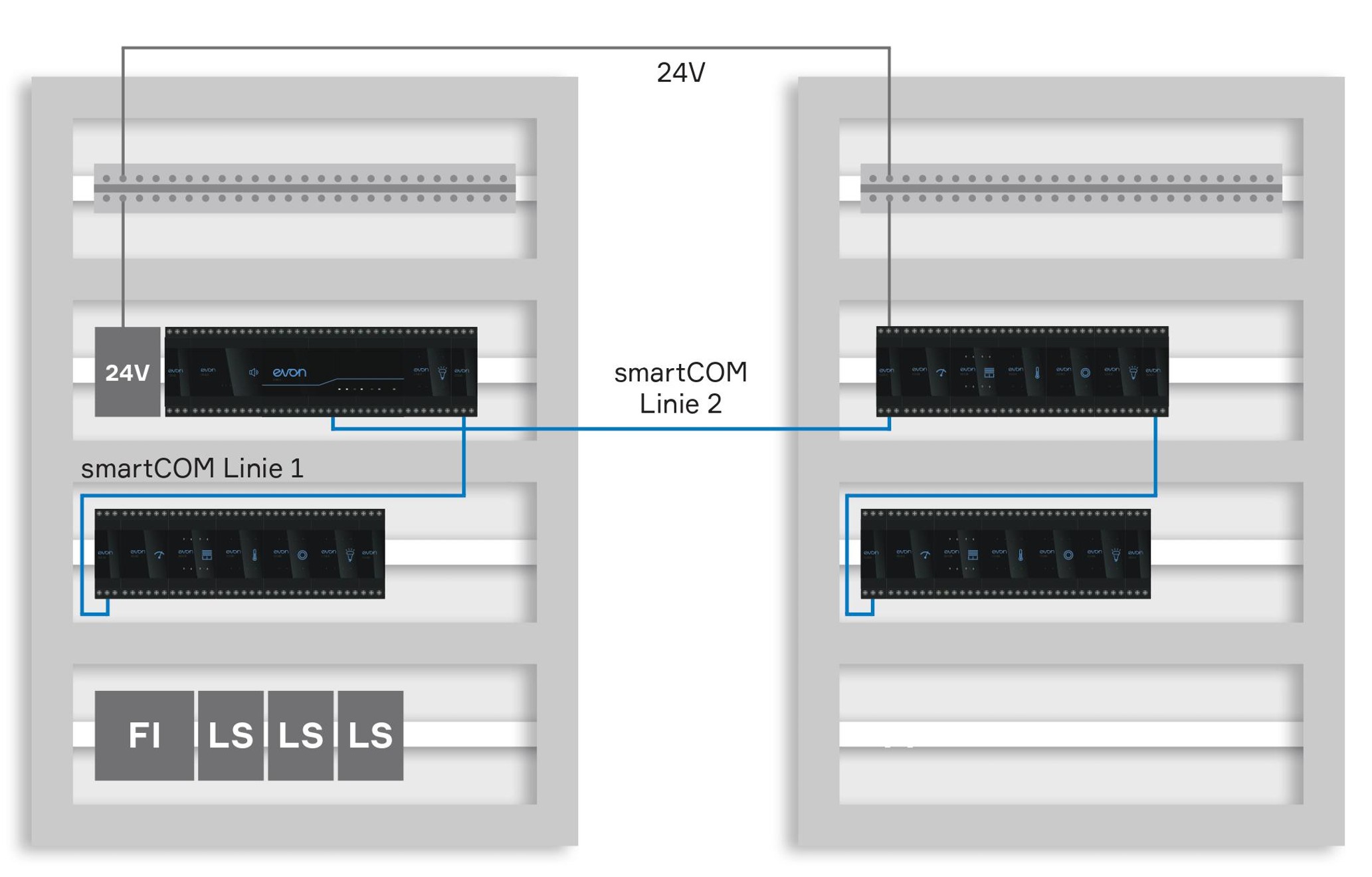
Je nach Platzbedarf und den räumlichen Gegebenheiten kann die gesamte Steuerung in einem zentralen Schaltschrank untergebracht oder auf mehrere Subverteiler aufgeteilt werden.
Der Einsatz von Subverteilern reduziert die benötigten Kabellängen und damit den Verkabelungsaufwand, zudem wird das Einziehen der Kabel erleichtert.
Für jeden Subverteiler ist ein Busverlängerungsmodul (Sys 1200) erforderlich, über das die evon Smart Home Module miteinander verbunden werden. Das Busverlängerungsmodul wird ebenfalls bei einem Zeilenumbruch benötigt, also wenn in einem Schaltschrank eine neue Zeile begonnen wird.